摩尔线程 GPU 云原生套件
摩尔线程 GPU 容器套件
简介
摩尔线程公司简介
元计算是支撑下一代互联网应用的通用算力平台。摩尔线程致力于创新面向元计算应用的新一代 GPU,构建融合视觉计算、3D 图形计算、科学计算及人工智能计算的综合计算平台,建立基于云原生 GPU 计算的生态系统,助力驱动数字经济发展。公司研发设计全功能 GPU 芯片及相关产品,支持 3D 高速图形渲染、AI 训练推理加速、超高清视频编解码和高性能科学计算等多种组合工作负载,兼顾算力与算效,能够为中国科技生态合作伙伴提供强大的计算加速能力,广泛赋能数字经济多个领域。
摩尔线程 GPU 芯片和服务器端显卡简介
截止 2022 年 12 月 22 日,摩尔线程已经成功研发并上市两颗 GPU 芯片:“苏堤”和“春晓”,分别于 2022 年 3 月和 2022 年 11 月发布。围绕着两颗 GPU 芯片,摩尔线程打造了三款服务器 GPU 产品,分别是 MTT S2000,MTT S1000 和 MTT S3000。目前两颗芯片和三款 GPU 显卡均已完成量产上市。
摩尔线程“苏堤”
“苏堤“芯片基于摩尔线程第一代 MUSA 架构,具有现代图形渲染、AI 计算加速以及科学计算机物理仿真等功能引擎。是第一款支持 AV1 编解码的 GPU,支持视频云、直播、8K 游戏等智能多媒体应用。
摩尔线程“春晓”
2022 年 11 月,摩尔线程发布的“春晓”芯片同样基于第一代 MUSA 架构打造,其内部集成了 220 亿个晶体管,内置 MUSA 架构通用计算核心以及张量计算核心,可以支持 FP32、FP16 和 INT8 等计算精度。相较于摩尔线程此前发布的“苏堤”芯片,图形渲染能力平均提升 3 倍、编码能力提升 4 倍、解码能力提升 2 倍,AI 计算平均提升 4 倍,物理仿真性能提升 2.5 倍,同时可节约带宽 30%以上。
MTT S2000
MTT S2000 基于“苏堤”芯片打造,物理形态为全高 3/4 单槽的服务器显卡,显卡采用被动散热方式,整卡功耗 150W,外接供电线为标准 PCIe 6pin。S2000 内置两颗“苏堤”芯片,并通过内置的 PCIe Switch 进行连接,显卡与计算机主机连接的物理接口为 PCIe x16。目前 S2000 的整体状态为量产出货状态,配套的 GPU 容器化套件,可以满足以容器的方式直接调用 S2000 的计算、存储、编解码等资源,并兼容 Docker 等常用容器工具以及 K8s 生态兼容。
MTT S1000
MTT S1000 基于“苏堤“芯片,物理形态为半高半长单槽;显卡采用被动散热方式,整卡功耗 75W,无需额外的外部供电线。S1000 内置一颗“苏堤”芯片,显卡与计算机连接的物理接口为 PCIe x16。目前 S1000 以及处于量产出货状态,配套的 GPU 容器化套件,可以满足以容器的方式直接调用 S1000 的计算、存储、编解码等资源,并兼容 Docker 等常用容器工具以及 K8s 生态兼容。
MTT S3000
MTT S3000 基于“春晓”芯片,物理形态为全高 3/4 长双槽。做为一款服务器端专用显卡,S3000 采用被动散热方式,整卡功耗 250W,外接供电线为标准 CPU 8pin。显卡的物理接口为 PCIE x16 并具备 PCIe Gen4 x16 的传输速率。在一个全功能的春晓芯片的支持下,S3000 的整体渲染、编解码性能相对于上一代芯片均具备明显的能力提升。目前 S3000 即将进入量产阶段。配套的 GPU 容器化套件,可以满足以容器的方式直接调用 S1000 的计算、存储、编解码等资源,并兼容 Docker 等常用容器工具以及 K8s 生态兼容。
摩尔线程 GPU 容器化技术简介
随着微服务和云原生技术的普遍应用,GPU 作为算力中心中 90%算力的贡献者,GPU 厂商需要提供适用于云原生的技术方案,即 GPU 容器化。摩尔线程提供了标准的容器运行时技术和 K8S 生态融入技术满足并行计算、AI 训练、AI 推理、云渲染、视频云等业务的支持
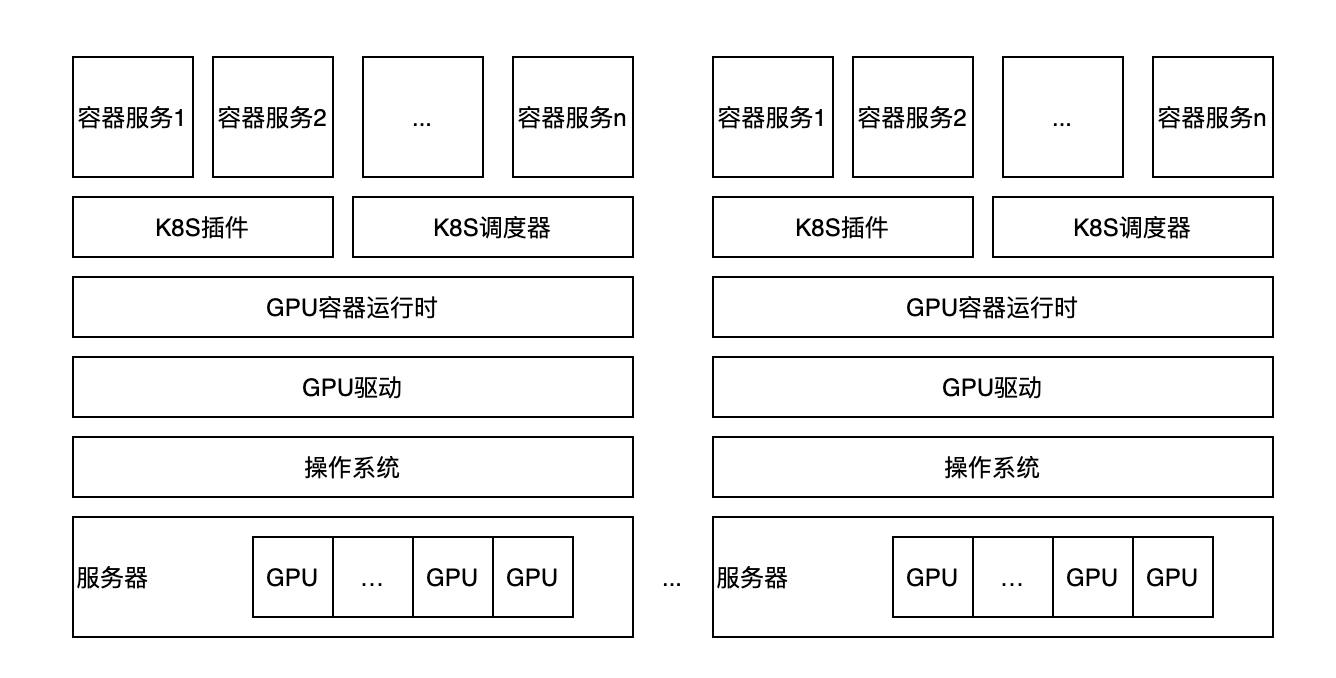
摩尔线程容器运行时技术
GPU 容器运行时技术从功能上说是通过摩尔线程开发的内容对接容器运行时,runc、rkt、imctfy 等,使得容器在启动时刻,可以将主机端的驱动程序和设备节点挂载到容器中。容器中不用另外处理关于设备的内容就就可以直接使用 GPU 设备进行计算。这样容器镜像可以保持为设备无关且无状态的属性,容器中的内容只关注于业务本身,便于后期的灵活扩展和跨设备,跨节点的技术特性。
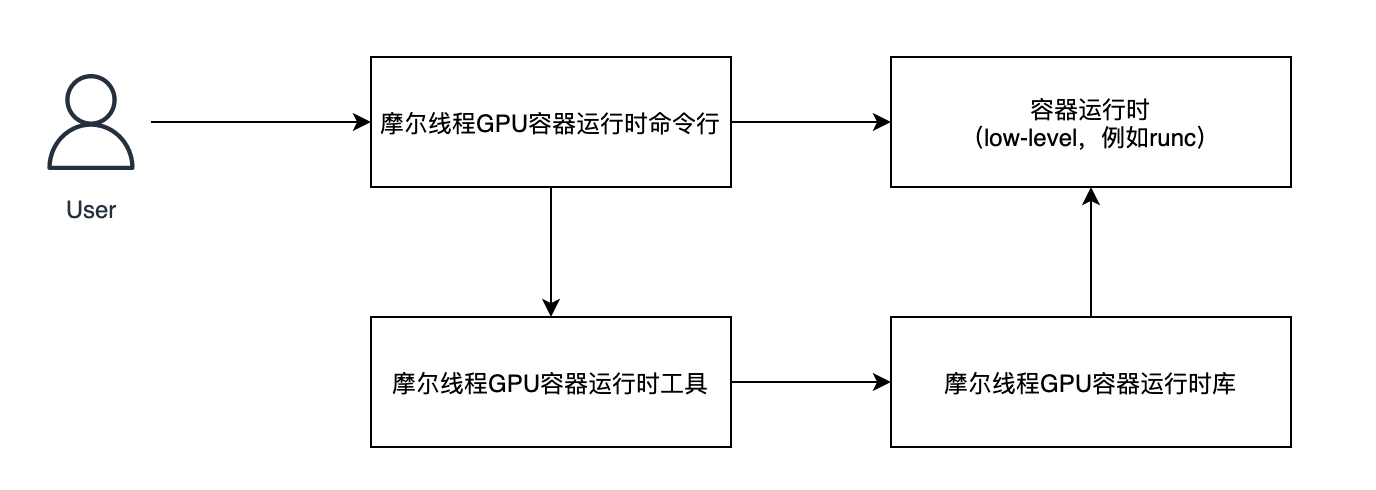
摩尔线程 GPU 容器化技术特点
GPU 容器化符合标 Kubernetes 和容器生态的标准,研发者可以沿袭目前的开发、部署方式使用摩尔线程的 GPU,业务迁移发生在容器底层,因此能够在上层用户无感知的情况下,通过底层的技术替换,完成从其它 GPU 设备到摩尔线程 GPU 设备的迁移。除此之外,摩尔线程 GPU 容器化能够使用 vGPU 最为最小的颗粒度进行调度,相比较于目前市场上只能通过以单 GPU 为进行调度来说,GPU 可以更好的被复用;而且,vGPU 提供了良好的算力隔离、显存隔离,并支持算力的灵活且分,从而可以支持快算力+大显存,普通算力+大显存,快算力+小显存等不同场景的业务需求。
摩尔线程弹性 GPU
数据中心中,设备的利用率一直是关系到整个服务成本的关键因素。目前设备的利用率都很难达到满意,CPU 利用率在大型的云中的利用率只有 30%,而 GPU 的利用率更低。尤其是在 AI 推理应用场景,经常需要把一块卡分给一个服务,而且很多时候设备就被服务所绑定了,造成了资源不能释放,利用率较低。
针对于上述用户的痛点,摩尔线程开发了弹性 GPU 功能特性。功能特性的框架如下图所示:
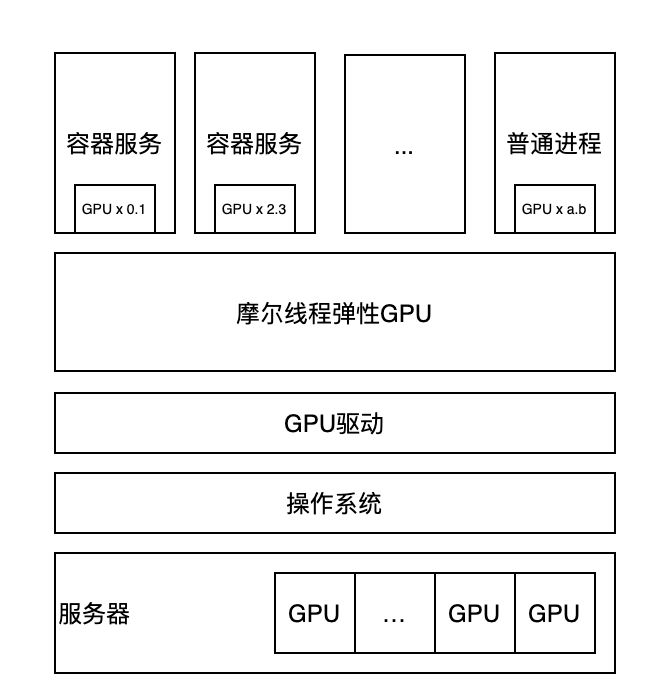
弹性 GPU 相对于普通的 GPU 和 GPU 虚拟化,提供了算力任意切分的功能,即容器服务或者是普通进程服务都可以使用小数倍的 GPU 算力资源,更加精细化的分配资源,从而提高整个集群的资源利用率。另外弹性 GPU 的任意切分功能提供了动态调整功能,可以随时根据上层服务的使用情况和整体的调度策略,分配不同的算力资源给各个使用者。弹性 GPU 的功能特性与上述 GPU 容器化技术融合,可以在容器化和 K8S 生态中提供给用户更加灵活的调度策略。
软件兼容性
GPU 容器化套件作为连接服务容器负载和 GPU 算力之间的桥梁,对于底层的 CPU 和操作系统有一定的依赖性。摩尔线程 GPU 容器套件在驱动兼容的范围之内实现了对上层容器生成、GPU 设备透传、sGPU 驱动等功能的支持。目前已经支持的环境如下表所示:
| 兼容项 | 型号及说明 |
|---|---|
| 服务器型号 | 附录 1:服务器兼容列表 |
| CPU 及操作系统 | Intel CPU + Ubuntu 20.04.1 |
| CPU 及操作系统 | Hygon CPU + UOS v20 1050e |
| CPU 及操作系统 | Phytium S2500 系列 CPU + 麒麟 V10 SP2 |
| CPU 及操作系统 | Kunpeng 920 系列 CPU + openEuler 20.03 SP3 |
| GPU | MTT S2000 |
| GPU | MTT S1000 |
| GPU | MTT S3000 |
| 容器化环境 | Docker 20.10 and later |
| 容器化环境 | containerd 1.5 and later |
| 容器化环境 | CRI-O 1.32.5 and later |
软件包内容和安装方法
部署 MT Container Toolkit
先决条件
在开始之前,请确保已为您的 Linux 发行版安装了最新的摩尔线程显卡驱动。您可以通过以下命令来进行验证:
❯ mthreads-gmi
Thu Jul 10 11:52:47 2025
---------------------------------------------------------------
    mthreads-gmi:2.0.0           Driver Version:3.0.0
---------------------------------------------------------------
ID   Name           |PCIe                |%GPU  Mem
     Device Type    |Pcie Lane Width     |Temp  MPC Capable
                                         |      ECC Mode
+-------------------------------------------------------------+
0    MTT S4000      |00000000:01:00.0    |0%    518MiB(49152MiB)
     Physical       |16x(16x)            |89C   YES
                                         |      N/A
---------------------------------------------------------------

---------------------------------------------------------------
Processes:
ID   PID       Process name                         GPU Memory
                                                         Usage
+-------------------------------------------------------------+
   No running processes found
---------------------------------------------------------------
安装 Docker CE
sudo apt install docker.io
更多安装信息请参考官方文档。
安装摩尔线程容器运行时套件
使用 dpkg 包管理工具进行安装:
sudo dpkg -i mtml_2.0.0.deb mt-container-toolkit_2.0.0.deb
绑定摩尔线程容器运行时到 Docker,设置默认的容器运行时为 mthreads 并重启 Docker daemon:
$ (cd /usr/bin/musa && sudo ./docker setup $PWD)
您可以通过如下命令验证上述步骤是否成功:
❯ docker run --rm --env MTHREADS_VISIBLE_DEVICES=all ubuntu:20.04 mthreads-gmi
Thu Jul 10 11:52:47 2025
---------------------------------------------------------------
    mthreads-gmi:2.0.0           Driver Version:3.0.0
---------------------------------------------------------------
ID   Name           |PCIe                |%GPU  Mem
     Device Type    |Pcie Lane Width     |Temp  MPC Capable
                                         |      ECC Mode
+-------------------------------------------------------------+
0    MTT S4000      |00000000:01:00.0    |0%    518MiB(49152MiB)
     Physical       |16x(16x)            |89C   YES
                                         |      N/A
---------------------------------------------------------------

---------------------------------------------------------------
Processes:
ID   PID       Process name                         GPU Memory
                                                         Usage
+-------------------------------------------------------------+
   No running processes found
---------------------------------------------------------------
可以看到在容器内部已经能够获取到摩尔线程 GPU 设备。
卸载 MT Container Toolkit
恢复 Docker 默认的容器运行时并重启 Docker daemon:
$ (cd /usr/bin/musa && sudo ./docker cleanup $PWD)
通过 dpkg 包管理工具卸载摩尔线程容器运行时套件:
$ sudo dpkg -r mt-container-toolkit mtml sgpu-dkms

# 完全卸载并清除配置文件
$ sudo dpkg -P mt-container-toolkit mtml sgpu-dkms
MT GPU Operator 2.0.0 部署
先决条件
在安装 MT GPU Operator 前, 您应该确保 Kubernetes 集群满足一些先决条件:
-
节点必须配置容器引擎,例如 Docker CE/EE、containerd 或 cri-o。安装 Docker请参见安装 Docker Engine。
-
节点功能发现 (NFD) 是每个节点上 GPU Operator 的依赖项。默认情况下,NFD master 和 worker 由 GPU Operator 自动部署。如果在部署 GPU Operator 之前,NFD 已在集群中运行,则可以将 GPU Operator 配置为不安装 NFD。
-
要在 Kubernetes 1.13 和 1.14 中进行监控,请启用 kubelet
KubeletPodResources[a] 功能门。从 Kubernetes 1.15 开始,默认启用KubeletPodResources。 -
要在 Kubernetes 中收集 GPU 使用数据,必须在集群中部署 Prometheus。
$ export VERSION=$(curl -s https://api.github.com/repos/prometheus-operator/prometheus-operator/releases | grep tag_name | grep -v -- '-rc' | grep -v -- '-alpha' | sort -r | head -1 | awk -F': ' '{print $2}' | sed 's/,//' | xargs)$ echo $VERSION$ kubectl create -f https://github.com/prometheus-operator/prometheus-operator/releases/download/${VERSION}/bundle.yaml -
要自动安装 MT 驱动程序,必须在集群内的每个节点上手动安装以下软件包:
-
LightDM 是一个跨桌面显示管理器,可以使用以下命令进行安装:
$ sudo apt install -y lightdm -
libdrm2是内核直接渲染管理器 (DRM) 服务的用户空间接口,可以使用以下命令进行安装。$ sudo apt install -y libdrm2注意:所需的最低版本是
2.4.99。
-
-
GPU 调度器是基于 Scheduling Framework 构建的。如果要启用此功能,请确保 Kubernetes 的版本大于
1.19. -
为了确保 sGPU DEB 包的成功安装,需要首先在集群内的每个节点上安装所需的依赖包
dkms。-
dkms可以使用以下命令安装:$ sudo apt install -y dkms注意:所需的最低版本是
1.95。
-
要启用 Kubelet Pod Resources 功能门,请运行以下命令:
echo -e "KUBELET_EXTRA_ARGS=--feature-gates=KubeletPodResources=true" | sudo tee /etc/default/kubelet
安装 MT GPU Operator
先将部署包下载,然后解压:
$ unzip mt-gpu-operator-2.0.0.zip
$ rm mt-gpu-operator-2.0.0.zip
$ cd operator_2.0.0
$ tree
.
├── change_image_repo.sh
├── end-user-cn.md
├── mt-gpu-operator-2.0.0.tgz
├── mt-gpu-operator-custom-resources-2.0.0.tgz
├── mt-gpu-operator.yaml
├── mthreads_v1alpha4_clusterconfig.yaml
├── mthreads_v1beta2_clusterpolicy.yaml
└── sync_image.sh

0 directories, 8 files
$ tar -xvzf mt-gpu-operator-2.0.0.tgz
$ tar -xvzf mt-gpu-operator-custom-resources-2.0.0.tgz
$ tree
.
├── change_image_repo.sh
├── end-user-cn.md
├── mt-gpu-operator
│   ├── Chart.yaml
│   ├── crds
│   │   ├── biosconfigs.mthreads.com-crd.yaml
│   │   ├── clusterconfigs.mthreads.com-crd.yaml
│   │   ├── clusterpolicies.mthreads.com-crd.yaml
│   │   └── nodeconfigs.mthreads.com-crd.yaml
│   ├── templates
│   │   ├── _helpers.tpl
│   │   ├── mt-controller-manager-cm.yaml
│   │   ├── mt-controller-manager-deployment.yaml
│   │   ├── mt-controller-manager-metrics-service-svc.yaml
│   │   ├── mt-controller-manager-sa.yaml
│   │   ├── mt-gpu-operator-cleanup-crd-job.yaml
│   │   ├── mt-gpu-operator-namespace.yaml
│   │   ├── mt-gpu-operator-upgrade-crd-job.yaml
│   │   ├── mt-leader-election-rolebinding-rb.yaml
│   │   ├── mt-leader-election-role-role.yaml
│   │   ├── mt-manager-rolebinding-crb.yaml
│   │   ├── mt-manager-role-cr.yaml
│   │   ├── mt-metrics-reader-cr.yaml
│   │   ├── mt-mutating-webhook-configuration-mutatingwebhookconfiguration.yaml
│   │   ├── mt-proxy-rolebinding-crb.yaml
│   │   ├── mt-proxy-role-cr.yaml
│   │   ├── mt-published-device-cm.yaml
│   │   ├── mt-validating-webhook-configuration-validatingwebhookconfiguration.yaml
│   │   └── mt-webhook-service-svc.yaml
│   └── values.yaml
├── mt-gpu-operator-2.0.0.tgz
├── mt-gpu-operator-custom-resources
│   ├── Chart.yaml
│   ├── templates
│   │   ├── _helpers.tpl
│   │   ├── mt-gpu-cluster-config-clusterconfig.yaml
│   │   └── mt-gpu-cluster-policy-clusterpolicy.yaml
│   └── values.yaml
├── mt-gpu-operator-custom-resources-2.0.0.tgz
├── mt-gpu-operator.yaml
├── mthreads_v1alpha4_clusterconfig.yaml
├── mthreads_v1beta2_clusterpolicy.yaml
└── sync_image.sh

5 directories, 38 files
镜像使用
同步到用户镜像仓库
部署包中提供镜像同步脚本,用户可以将registry.mthreads.com上的镜像同步到自己的内网harbor中:
$ ./sync_image.sh registry.mthreads.com/mcconline <your.registry.com/repo>
部署包中提供了脚本 change_image_repo.sh 来为用户修改部署包下所有文件中的镜像仓库地址,使用方式如下:
$ ./change_image_repo.sh registry.mthreads.com/mcconline <your.registry.com/repo>
使用 Helm 安装
MT GPU Operator Helm charts 提供了多个可自定义的选项,可以根据您的环境进行配置。
Chart 自定义选项
使用 Helm chart 时可以使用以下选项。这些选项可以与 --set 一起使用。
-
mt-gpu-operator
参数 描述 默认值 namespaceMT GPU Operator 部署在哪个命名空间下。 mt-gpu-operator -
mt-gpu-operator-custom-resources
| 参数 | 描述 | 默认值 |
|---|---|---|
mtGpuClusterPolicyClusterpolicy.nfd.enabled | 将节点功能发现插件部署为 DaemonSet。 如果 NFD 已在集群中运行,请将此变量设置为 false。 | true |
mtGpuClusterPolicyClusterpolicy.driverToolkit.enabled | 默认情况下,GPU Operator 将 MT 驱动程序部署为系统上的容器。在预装 MT 驱动程序的系统上使用 GPU Operator 时,应将此值设置为 false。 | true |
mtGpuClusterPolicyClusterpolicy.containerToolkit.enabled | 默认情况下,GPU Operator 将 MT Container Toolkit 部署为系统上的容器。在预装 MT Container Toolkit 的系统上使用 GPU Operator 时,请将此值设置为 false。 | true |
mtGpuClusterPolicyClusterpolicy.kured.enabled | 将 kured 插件部署为 DaemonSet。如果 kured 已在集群中运行,则将此变量设置为 false。 | true |
mtGpuClusterPolicyClusterpolicy.nodeProblemDetector.enabled | 将节点问题检测器 (NPD) 插件部署为 DaemonSet。如果 NPD 已在集群中运行,请将此变量设置为 false。 | true |
mtGpuClusterPolicyClusterpolicy.aiOps.enabled | 默认情况下,GPU Operator 将 MT AIOps 部署为系统上的容器。如果不需要此组件,请将此值设置为 false。 | true |
mtGpuClusterPolicyClusterpolicy.gpuScheduler.enabled | 默认情况下,GPU Operator 不部署 GPU Scheduler。如果您想使用 sGPU,请将此变量设置为 true。 | false |
mtGpuClusterPolicyClusterpolicy.gpuWebhook.enabled | 默认情况下,GPU Operator 不部署 GPU Webhook。如果您想使用 sGPU,请将此变量设置为 true。 | false |
mtGpuClusterPolicyClusterpolicy.kubevirt.enabled | 默认情况下,GPU Operator 部署 KubeVirt 补丁以启用 vGPU 和 GPU 直通。如果要启用虚拟机工作负载,请将此值设置为 true。 | false |
mtGpuClusterPolicyClusterpolicy.dcgm.enabled | 默认情况下,GPU Operator 会部署DCGM组件,该组件是一套 GPU 管理和监控的核心组件。 如果不需要该功能,请将此值设置为 false。 | true |
mtGpuClusterPolicyClusterpolicy.dcgmExporter.enabled | 默认情况下,GPU Operator 会部署DCGM Exporter组件,该组件是基于 DCGM 的 Prometheus Exporter。 如果不需要该功能,请将此值设置为 false。 | true |
常见部署场景
本节介绍使用 Helm chart 安装 MT GPU Operator 时的一些常见部署方案。
-
自定义驱动安装
自定义驱动程序工具包配置,用户最好将驱动下载到设备节点本地目录
/usr/data下,然后参考如何指定驱动并配置和本地获取包然后修改 mt-gpu-operator-custom-resources/values.yaml。
$ helm install --wait mt-gpu-operator mt-gpu-operator
$ helm install --wait mt-gpu-operator-custom-resources mt-gpu-operator-custom-resources
- 如果机器上预装了驱动程序和 MT 容器工具包
本示例节点上已预安装 MT 驱动程序和 MT Container Toolkit。
在安装 MT GPU Operator 之前,请确保集群中的容器运行时已配置良好。
Docker:
```bash
$ cat /etc/docker/daemon.json | grep default-runtime
    "default-runtime": "mthreads",
```

containerd:
```bash
$ cat /etc/containerd/config.toml | grep default_runtime_name
      default_runtime_name = "mthreads"
```

使用以下选项安装 MT GPU Operator。
```bash
$ helm install --wait mt-gpu-operator mt-gpu-operator
$ helm install --wait mt-gpu-operator-custom-resources mt-gpu-operator-custom-resources \
     --set mtGpuClusterPolicyClusterpolicy.driverToolkit.enabled=false \
  	 --set mtGpuClusterPolicyClusterpolicy.containerToolkit.enabled=false
```
- 自定义 sGPU 配置
默认情况下,sGPU 相关功能处于禁用状态。如果你想在 k8s 中使用 sGPU,你需要开启 GPU scheduler 组件和 GPU Webhook 组件,使用如下命令安装 mt-gpu-operator 和 mt-gpu-operator-custom-resources:
$ helm install --wait mt-gpu-operator mt-gpu-operator
$ helm install --wait mt-gpu-operator-custom-resources  mt-gpu-operator-custom-resources \
		 --set mtGpuClusterPolicyClusterpolicy.gpuScheduler.enabled=true \
     --set mtGpuClusterPolicyClusterpolicy.gpuWebhook.enabled=true
验证 GPU Operator 安装
安装 Helm Chart 后,检查 Pod 的状态以确保所有容器都在运行并且验证已完成。
$ kubectl get pods -n mt-gpu-operator
NAME                                       READY   STATUS    RESTARTS      AGE
kured-xzgk9                                1/1     Running   0             28m
mt-aiops-784789fd44-6cwdf                  1/1     Running   0             17m
mt-container-toolkit-daemonset-28466       1/1     Running   0             35s
mt-controller-manager-77674d7677-sgx99     2/2     Running   0             29m
mt-dcgm-8gwtd                              1/1     Running   0             32s
mt-dcgm-exporter-zbrb4                     1/1     Running   1             35s
mt-driver-toolkit-wxcsz                    1/1     Running   0             28m
mt-gpu-exporter-jsjwk                      1/1     Running   0             33s
mt-gpu-feature-discovery-zrlhn             1/1     Running   0             34s
mt-node-status-exporter-kdgb4              1/1     Running   0             33s
mt-operator-validator-qt4tg                1/1     Running   0             32s
mt-universal-gpu-device-controller-bx29w   1/1     Running   0             34s
nfd-master-8699f4456b-jszpc                1/1     Running   0             28m
nfd-worker-7k9g8                           1/1     Running   0             28m
nfd-worker-htsbc                           1/1     Running   0             28m
nfd-worker-szsjd                           1/1     Running   0             28m
node-problem-detector-26tgc                1/1     Running   0             28m
node-problem-detector-ntsx7                1/1     Running   0             28m
node-problem-detector-vsjnx                1/1     Running   0             28m
使用 YAML 部署 MT GPU Operator
以下是如何使用 yaml 文件安装 MT GPU Operator 当前官方版本的示例。
$ kubectl apply -f mt-gpu-operator.yaml
等待 mt-controller-manager pod ready:
$ kubectl get po -n mt-gpu-operator
NAME                                       READY   STATUS    RESTARTS        AGE
mt-controller-manager-68fc5978f5-c2rpf     2/2     Running   0               24s
根据需要修改 mthreads_v1beta1_clusterpolicy 文件,然后创建该 CR:
$ kubectl apply -f mthreads_v1beta1_clusterpolicy.yaml
修改 mthreads_v1alpha4_clusterconfig.yaml 文件,指定驱动等配置:
$ kubectl apply -f mthreads_v1alpha4_clusterconfig.yaml
检查 MT GPU Operator 管理的组件的状态是否都是 Running:
$ kubectl get po -n mt-gpu-operator
NAME                                       READY   STATUS    RESTARTS      AGE
kured-xzgk9                                1/1     Running   0             28m
mt-aiops-784789fd44-6cwdf                  1/1     Running   0             17m
mt-container-toolkit-daemonset-28466       1/1     Running   0             35s
mt-controller-manager-77674d7677-sgx99     2/2     Running   0             29m
mt-dcgm-8gwtd                              1/1     Running   0             32s
mt-dcgm-exporter-zbrb4                     1/1     Running   0             35s
mt-driver-toolkit-wxcsz                    1/1     Running   0             28m
mt-gpu-exporter-jsjwk                      1/1     Running   0             33s
mt-gpu-feature-discovery-zrlhn             1/1     Running   0             34s
mt-node-status-exporter-kdgb4              1/1     Running   0             33s
mt-operator-validator-qt4tg                1/1     Running   0             32s
mt-universal-gpu-device-controller-bx29w   1/1     Running   0             34s
nfd-master-8699f4456b-jszpc                1/1     Running   0             28m
nfd-worker-7k9g8                           1/1     Running   0             28m
nfd-worker-htsbc                           1/1     Running   0             28m
nfd-worker-szsjd                           1/1     Running   0             28m
node-problem-detector-26tgc                1/1     Running   0             28m
node-problem-detector-ntsx7                1/1     Running   0             28m
node-problem-detector-vsjnx                1/1     Running   0             28m
通过ClusterConfig快速安装驱动
- 用户在安装完mt-gpu-operator和mt-gpu-operator-custom-resources两个chart后,需要手动配置为集群配置驱动。
- 用戶需要在每个gpu节点上的
/usr/data目录(如该目录不存在,就创建出来)下放置ddk和mtml两个deb包。 - 修改 ClusterConfig CR对象, ClusterConfig对象用于控制集群哪些节点安装哪些驱动。
$ kubectl edit clusterconfig gpu-cluster-config
ClusterConfig按如下配置:
apiVersion: mthreads.com/v1alpha4
kind: ClusterConfig
metadata:
  name: gpu-cluster-config
spec:
  upgradePolicy:
    autoUpgrade: true
    allocateStrategy: all
    drain:
      deleteEmptyDir: false
      enable: false
      force: false
      timeoutSeconds: 300
    maxParallelUpgrades: 1
    podDeletion:
      deleteEmptyDir: false
      force: false
      timeoutSeconds: 300
    waitForCompletion:
      timeoutSeconds: 0
      podSelector: ""
  nodes:
  - nodePoolName: node-pool-1
    drivers:
    - kind: musa
      local:
        filePath: /usr/data/musa.deb
    - kind: libmtml.so
      local:
        filePath: /usr/data/mtml.deb
    clusterGpuTargetRatio:
      gpu: 100%
    workspaceDir: /app/data
    sgpuSpec:
      "max_inst": "16"
      "policy": "0"
      "overcommit_ratio": "1.1"
      "time_slice": "1"
    selector:
      matchExpressions:
      - key: kubernetes.io/arch #这是节点上的label,用户根据需要配置label key
        operator: In
        values:
        - amd64
等待 NodeConfig 对象 InstallDone:
$ kubectl get nodeconfig
NAME       DRIVER UPGRADE STATE   NODE POOL    INSTALLATION TIMEOUT
worker-1   InstallDone            node-pool-1
worker-2   InstallDone            node-pool-1
worker-3   InstallDone            node-pool-1
worker-4   InstallDone            node-pool-1
InstallDone 的节点上可以看到 gpu 资源:
$ kubectl describe node worker-4
...
Capacity:
  mthreads.com/gpu:               8
...
卸载 MT GPU Operator
使用 Helm 卸载 MT GPU Operator
可以通过运行以下命令卸载 MT GPU Operator Custom resource 的 chart:
$ helm uninstall mt-gpu-operator-custom-resources
然后执行以下命令卸载 MT GPU Operator 的 chart:
$ helm uninstall mt-gpu-operator
运行 helm uninstall 不会删除 CRD。您可以使用以下命令删除 CRD:
$ kubectl delete --ignore-not-found=true crd clusterconfigs.mthreads.com clusterpolicies.mthreads.com nodeconfigs.mthreads.com
使用 YAML 卸载
$ kubectl delete -f mthreads_v1alpha4_clusterconfig.yaml
$ kubectl delete -f mthreads_v1beta2_clusterpolicy.yaml
$ kubectl delete -f mt-gpu-operator.yaml
MT Container Toolkit 使用指导
摩尔线程容器运行时可以使用以下环境变量对容器中的 GPU 设备进行设置:
MTHREADS_VISIBLE_DEVICES设置挂载到容器中的摩尔线程 GPU 设备。MTHREADS_DRIVER_CAPABILITIES设置容器中用户态驱动程序的能力。
GPU 枚举
通过设置 MTHREADS_VISIBLE_DEVICES 环境变量可以指定特定的 GPU 设备到容器中。
MTHREADS_VISIBLE_DEVICES 可以设置的值如下:
| 可设置的值 | 描述 |
|---|---|
0,1,2, 或者 438e3949-f6f2-f7b4-c904-8ffb9d6fa9d3 | 通过 GPU 的设备编号或者 GPU UUID 指定。 |
all | 所有的 GPU 设备均可见。 |
void, empty 或者 unset | mthreads-container-runtime 的行为将和 runc[1] 保持一致。 |
示例:
使用全部 GPU:
❯ docker run --rm -e MTHREADS_VISIBLE_DEVICES=all ubuntu:20.04 mthreads-gmi
Thu Jul 10 11:52:47 2025
---------------------------------------------------------------
    mthreads-gmi:2.0.0           Driver Version:3.0.0
---------------------------------------------------------------
ID   Name           |PCIe                |%GPU  Mem
     Device Type    |Pcie Lane Width     |Temp  MPC Capable
                                         |      ECC Mode
+-------------------------------------------------------------+
0    MTT S4000      |00000000:01:00.0    |0%    518MiB(49152MiB)
     Physical       |16x(16x)            |89C   YES
                                         |      N/A
---------------------------------------------------------------

---------------------------------------------------------------
Processes:
ID   PID       Process name                         GPU Memory
                                                         Usage
+-------------------------------------------------------------+
   No running processes found
---------------------------------------------------------------
使用设备号指定 GPU:
❯ docker run --rm -e MTHREADS_VISIBLE_DEVICES=1 ubuntu:20.04 mthreads-gmi
Thu Jul 10 11:52:47 2025
---------------------------------------------------------------
    mthreads-gmi:2.0.0           Driver Version:3.0.0
---------------------------------------------------------------
ID   Name           |PCIe                |%GPU  Mem
     Device Type    |Pcie Lane Width     |Temp  MPC Capable
                                         |      ECC Mode
+-------------------------------------------------------------+
0    MTT S4000      |00000000:01:00.0    |0%    518MiB(49152MiB)
     Physical       |16x(16x)            |89C   YES
                                         |      N/A
---------------------------------------------------------------

---------------------------------------------------------------
Processes:
ID   PID       Process name                         GPU Memory
                                                         Usage
+-------------------------------------------------------------+
   No running processes found
---------------------------------------------------------------
使用 GPU UUID 指定 GPU:
❯ mthreads-gmi --query | grep UUID
    GPU UUID                                      :  7e8581f5-6722-035b-9b7f-07b8ed270fd0
    GPU UUID                                      :  2716ae75-44e4-231b-df26-f7c2c4abb678
❯ docker run --rm -e MTHREADS_VISIBLE_DEVICES=2716ae75-44e4-231b-df26-f7c2c4abb678 ubuntu:20.04 mthreads-gmi
Thu Jul 10 11:52:47 2025
---------------------------------------------------------------
    mthreads-gmi:2.0.0           Driver Version:3.0.0
---------------------------------------------------------------
ID   Name           |PCIe                |%GPU  Mem
     Device Type    |Pcie Lane Width     |Temp  MPC Capable
                                         |      ECC Mode
+-------------------------------------------------------------+
0    MTT S4000      |00000000:01:00.0    |0%    518MiB(49152MiB)
     Physical       |16x(16x)            |89C   YES
                                         |      N/A
---------------------------------------------------------------

---------------------------------------------------------------
Processes:
ID   PID       Process name                         GPU Memory
                                                         Usage
+-------------------------------------------------------------+
   No running processes found
---------------------------------------------------------------
驱动能力
MTHREADS_DRIVER_CAPABILITIES 用于控制容器中用户态驱动程序的能力。
MTHREADS_DRIVER_CAPABILITIES 可以设置的值如下:
| 可设置的值 | 描述 |
|---|---|
compute,video 或者 graphics,utility | 可以传入多个驱动能力,以 “,” 为分割符。 |
all | GPU 所有的能力。 |
| empty 或者 unset | 设置默认值: compute, utility。 |
void | 不挂载任何驱动能力。 |
支持设置的驱动能力列表。
| 驱动能力 | 描述 |
|---|---|
compute | 使用 MUSA 和 OpenCL 的应用。 |
graphics | 使用 OpenGL 和 Vulkan 的应用。 |
utility | 使用 mthreads-gmi 和 MTML。 |
video | 使用编解码能力的应用。 |
示例:
❯ docker run --rm \
      -e MTHREADS_VISIBLE_DEVICES=all \
      -e MTHREADS_DRIVER_CAPABILITIES=compute,utility \
      ubuntu:20.04 mthreads-gmi
Thu Jul 10 11:52:47 2025
---------------------------------------------------------------
    mthreads-gmi:2.0.0           Driver Version:3.0.0
---------------------------------------------------------------
ID   Name           |PCIe                |%GPU  Mem
     Device Type    |Pcie Lane Width     |Temp  MPC Capable
                                         |      ECC Mode
+-------------------------------------------------------------+
0    MTT S4000      |00000000:01:00.0    |0%    518MiB(49152MiB)
     Physical       |16x(16x)            |89C   YES
                                         |      N/A
---------------------------------------------------------------

---------------------------------------------------------------
Processes:
ID   PID       Process name                         GPU Memory
                                                         Usage
+-------------------------------------------------------------+
   No running processes found
---------------------------------------------------------------
sGPU
MTHREADS_QOS_MEMORY_LIMIT 控制一个 sGPU 设备可以消耗的最大内存,单位是字节,MTHREADS_QOS_COMPUTING_POWER_WEIGHT 指定一个 sGPU 设备在分配计算能力时的权重。
注意:
MTHREADS_QOS_COMPUTING_POWER_WEIGHT是可选的。默认值是1。- 在使用前面的环境变量之前,请确保 sGPU 内核模块已经正确安装和加载。
- sGPU 目前仅支持 MUSA SDK V4.0.0 以下版本(不含 4.0.0),建议在该版本范围内使用以避免兼容性问题。
你需要将 MTHREADS_VISIBLE_DEVICES 和前面的环境变量一起指定。
下面的例子通过设置 MTHREADS_VISIBLE_DEVICES 为 0 来指定 GPU 0 为共享内存和计算能力的物理 GPU。MTHREADS_QOS_MEMORY_LIMIT=1073741824 表示 sGPU 设备可以消耗最多 1 GB 的内存。MTHREADS_QOS_COMPUTING_POWER_WEIGHT=2 表示 sGPU 设备在分配计算能力时的权重为 2。
$ docker run --rm \
      -e MTHREADS_VISIBLE_DEVICES=0 \
      -e MTHREADS_QOS_MEMORY_LIMIT=1073741824 \
      -e MTHREADS_QOS_COMPUTING_POWER_WEIGHT=2 \
      ubuntu mthreads-gmi
Wed Sep 14 08:10:53 2022
--------------------------------------------------------------
    mthreads-gmi:1.1.0           Driver Version:N/A
--------------------------------------------------------------
ID        Name      |PCIe                |%GPU Mem
                    |Pcie Lane Width     |     Temp
+------------------------------------------------------------+
0         MTT S2000 |N/A                 |0%   12MiB(1024MiB)
                    |N/A                 |     46C
--------------------------------------------------------------

--------------------------------------------------------------
Processes:
ID   PID       Process name                        GPU Memory
                                                        Usage
+------------------------------------------------------------+
   No running processes found
--------------------------------------------------------------
GDS
SmartIO 的 GPUDirect Storage 技术为了与 mtfs.ko 内核模块栈进行通信,需要可以访问字符设备。为了在 Docker 环境中启用 GPUDirect Storage 支持,新增了一个名为 MTHREADS_GDS 的环境变量,在使用 docker command 部署环境和在容器内测试 GDS 的时候来使能 GPUDirect Storage 支持
比如,如果你要创建 container 使用 GDS,你可以使用下面的命令
docker run -e MTHREADS_GDS=enable \
     -e MTHREADS_VISIBLE_DEVICES=all \
      [OPTIONS] IMAGE [COMMAND] [ARG...]
Note:
MTHREADS_GDSmust work with theMTHREADS_VISIBLE_DEVICESenvironment variable.
Dockerfiles
构建容器镜像时在 Dockerfile 添加环境变量,运行容器时就无需再指定它们。
ENV MTHREADS_VISIBLE_DEVICES all
ENV MTHREADS_DRIVER_CAPABILITIES compute,utility
MT GPU Operator 使用指南
基本操作和维护
检查组件
检查 ClusterPolicy 的状态是否就绪:
$ kubectl get clusterpolicy mt-gpu-cluster-policy -o yaml
...
status:
  namespace: mt-gpu-operator
  state: ready
如果 status 没有出现在 ClusterPolicy 中,这意味着一些组件还没有准备好。你应该检查 mt-controller-manager Pod 日志:
$ kubectl -n mt-gpu-operator logs  mt-controller-manager-7bbfbfc44c-7f7x6 --tail=40
I0823 08:21:15.048441       1 object_controls.go:1111] controllers/ClusterPolicy "msg"="DEBUG: DaemonSet"  "LabelSelector"="app=node-problem-detector"
I0823 08:21:15.048509       1 object_controls.go:1117] controllers/ClusterPolicy "msg"="DEBUG: DaemonSet"  "NumberOfDaemonSets"=1
I0823 08:21:15.048530       1 object_controls.go:1123] controllers/ClusterPolicy "msg"="DEBUG: DaemonSet"  "NumberUnavailable"=0
I0823 08:21:15.048561       1 clusterpolicy_controller.go:212] controllers/ClusterPolicy "msg"="INFO: ClusterPolicy step completed"  "state:"="state-node-problem-detector" "status"="ready"
I0823 08:21:15.053998       1 object_controls.go:82] controllers/ClusterPolicy "msg"="Found Resource, skipping update" "Namespace"="mt-gpu-operator" "ServiceAccount"="mt-aiops"
I0823 08:21:15.066734       1 object_controls.go:207] controllers/ClusterPolicy "msg"="Found Resource, updating..." "ClusterRole"="mt-aiops" "Namespace"="mt-gpu-operator"
I0823 08:21:15.092702       1 object_controls.go:251] controllers/ClusterPolicy "msg"="Found Resource, updating..." "ClusterRoleBinding"="mt-aiops" "Namespace"="mt-gpu-operator"
I0823 08:21:15.105337       1 object_controls.go:1573] controllers/ClusterPolicy "msg"="Deployment identical, skipping update" "Deployment"="mt-aiops" "Namespace"="mt-gpu-operator" "name"="mt-aiops"
I0823 08:21:15.105373       1 object_controls.go:1486] controllers/ClusterPolicy "msg"="DEBUG: Deployment"  "LabelSelector"="app=mt-aiops"
I0823 08:21:15.105451       1 object_controls.go:1492] controllers/ClusterPolicy "msg"="DEBUG: Deployment"  "NumberOfDeployment"=1
I0823 08:21:15.105482       1 object_controls.go:1498] controllers/ClusterPolicy "msg"="DEBUG: Deployment"  "NumberUnavailable"=0
I0823 08:21:15.105504       1 object_controls.go:1461] controllers/ClusterPolicy "msg"="DEBUG: Pod"  "LabelSelector"="app=mt-aiops"
I0823 08:21:15.105611       1 object_controls.go:1467] controllers/ClusterPolicy "msg"="DEBUG: Pod"  "NumberOfPods"=1
I0823 08:21:15.105644       1 object_controls.go:1478] controllers/ClusterPolicy "msg"="DEBUG: Pod"  "=="="Running" "Phase"="Running"
I0823 08:21:15.105670       1 clusterpolicy_controller.go:212] controllers/ClusterPolicy "msg"="INFO: ClusterPolicy step completed"  "state:"="state-aiops" "status"="ready"
I0823 08:21:15.109247       1 object_controls.go:82] controllers/ClusterPolicy "msg"="Found Resource, skipping update" "Namespace"="mt-gpu-operator" "ServiceAccount"="mt-operator-validator"
I0823 08:21:15.110138       1 object_controls.go:1200] controllers/ClusterPolicy "msg"="DaemonSet identical, skipping update" "DaemonSet"="mt-operator-validator" "Namespace"="mt-gpu-operator" "name"="mt-operator-validator"
I0823 08:21:15.110163       1 object_controls.go:1111] controllers/ClusterPolicy "msg"="DEBUG: DaemonSet"  "LabelSelector"="app=mt-operator-validator"
I0823 08:21:15.110228       1 object_controls.go:1117] controllers/ClusterPolicy "msg"="DEBUG: DaemonSet"  "NumberOfDaemonSets"=1
I0823 08:21:15.110248       1 object_controls.go:1123] controllers/ClusterPolicy "msg"="DEBUG: DaemonSet"  "NumberUnavailable"=1
I0823 08:21:15.110279       1 clusterpolicy_controller.go:212] controllers/ClusterPolicy "msg"="INFO: ClusterPolicy step completed"  "state:"="state-operator-validation" "status"="notReady"
I0823 08:21:15.110909       1 object_controls.go:1200] controllers/ClusterPolicy "msg"="DaemonSet identical, skipping update" "DaemonSet"="mt-gpu-feature-discovery" "Namespace"="mt-gpu-operator" "name"="mt-gpu-feature-discovery"
I0823 08:21:15.110928       1 object_controls.go:1111] controllers/ClusterPolicy "msg"="DEBUG: DaemonSet"  "LabelSelector"="app=mt-gpu-feature-discovery"
I0823 08:21:15.110969       1 object_controls.go:1117] controllers/ClusterPolicy "msg"="DEBUG: DaemonSet"  "NumberOfDaemonSets"=1
I0823 08:21:15.110985       1 object_controls.go:1123] controllers/ClusterPolicy "msg"="DEBUG: DaemonSet"  "NumberUnavailable"=1
I0823 08:21:15.111007       1 clusterpolicy_controller.go:212] controllers/ClusterPolicy "msg"="INFO: ClusterPolicy step completed"  "state:"="state-gpu-feature-discovery" "status"="notReady"
I0823 08:21:15.115416       1 object_controls.go:82] controllers/ClusterPolicy "msg"="Found Resource, skipping update" "Namespace"="mt-gpu-operator" "ServiceAccount"="mt-device-plugin"
I0823 08:21:15.129355       1 object_controls.go:207] controllers/ClusterPolicy "msg"="Found Resource, updating..." "ClusterRole"="mt-device-plugin" "Namespace"="mt-gpu-operator"
I0823 08:21:15.154087       1 object_controls.go:251] controllers/ClusterPolicy "msg"="Found Resource, updating..." "ClusterRoleBinding"="mt-device-plugin" "Namespace"="mt-gpu-operator"
I0823 08:21:15.167282       1 object_controls.go:1200] controllers/ClusterPolicy "msg"="DaemonSet identical, skipping update" "DaemonSet"="mt-device-plugin" "Namespace"="mt-gpu-operator" "name"="mt-device-plugin"
I0823 08:21:15.167309       1 object_controls.go:1111] controllers/ClusterPolicy "msg"="DEBUG: DaemonSet"  "LabelSelector"="app=mt-device-plugin"
I0823 08:21:15.167363       1 object_controls.go:1117] controllers/ClusterPolicy "msg"="DEBUG: DaemonSet"  "NumberOfDaemonSets"=1
I0823 08:21:15.167383       1 object_controls.go:1123] controllers/ClusterPolicy "msg"="DEBUG: DaemonSet"  "NumberUnavailable"=1
I0823 08:21:15.167408       1 clusterpolicy_controller.go:212] controllers/ClusterPolicy "msg"="INFO: ClusterPolicy step completed"  "state:"="state-device-plugin" "status"="notReady"
I0823 08:21:15.167970       1 object_controls.go:1200] controllers/ClusterPolicy "msg"="DaemonSet identical, skipping update" "DaemonSet"="mt-gpu-exporter" "Namespace"="mt-gpu-operator" "name"="mt-gpu-exporter"
I0823 08:21:15.167991       1 object_controls.go:1111] controllers/ClusterPolicy "msg"="DEBUG: DaemonSet"  "LabelSelector"="app=mt-gpu-exporter"
I0823 08:21:15.168034       1 object_controls.go:1117] controllers/ClusterPolicy "msg"="DEBUG: DaemonSet"  "NumberOfDaemonSets"=1
I0823 08:21:15.168052       1 object_controls.go:1123] controllers/ClusterPolicy "msg"="DEBUG: DaemonSet"  "NumberUnavailable"=1
I0823 08:21:15.168075       1 clusterpolicy_controller.go:212] controllers/ClusterPolicy "msg"="INFO: ClusterPolicy step completed"  "state:"="state-gpu-exporter" "status"="notReady"
I0823 08:21:15.168101       1 clusterpolicy_controller.go:226] controllers/ClusterPolicy "msg"="ClusterPolicy isn't ready"  "states not ready"=["state-container-toolkit","state-operator-validation","state-gpu-feature-discovery","state-device-plugin","state-gpu-exporter"]
$ kubectl logs mt-controller-manager-7bbfbfc44c-7f7x6 --tail=20
I0823 08:21:42.445557       1 clusterpolicy_controller.go:212] controllers/ClusterPolicy "msg"="INFO: ClusterPolicy step completed"  "state:"="state-operator-validation" "status"="notReady"
I0823 08:21:42.446278       1 object_controls.go:1200] controllers/ClusterPolicy "msg"="DaemonSet identical, skipping update" "DaemonSet"="mt-gpu-feature-discovery" "Namespace"="mt-gpu-operator" "name"="mt-gpu-feature-discovery"
I0823 08:21:42.446300       1 object_controls.go:1111] controllers/ClusterPolicy "msg"="DEBUG: DaemonSet"  "LabelSelector"="app=mt-gpu-feature-discovery"
I0823 08:21:42.446349       1 object_controls.go:1117] controllers/ClusterPolicy "msg"="DEBUG: DaemonSet"  "NumberOfDaemonSets"=1
I0823 08:21:42.446368       1 object_controls.go:1123] controllers/ClusterPolicy "msg"="DEBUG: DaemonSet"  "NumberUnavailable"=1
I0823 08:21:42.446398       1 clusterpolicy_controller.go:212] controllers/ClusterPolicy "msg"="INFO: ClusterPolicy step completed"  "state:"="state-gpu-feature-discovery" "status"="notReady"
I0823 08:21:42.450740       1 object_controls.go:82] controllers/ClusterPolicy "msg"="Found Resource, skipping update" "Namespace"="mt-gpu-operator" "ServiceAccount"="mt-device-plugin"
I0823 08:21:42.462734       1 object_controls.go:207] controllers/ClusterPolicy "msg"="Found Resource, updating..." "ClusterRole"="mt-device-plugin" "Namespace"="mt-gpu-operator"
I0823 08:21:42.487206       1 object_controls.go:251] controllers/ClusterPolicy "msg"="Found Resource, updating..." "ClusterRoleBinding"="mt-device-plugin" "Namespace"="mt-gpu-operator"
I0823 08:21:42.499236       1 object_controls.go:1200] controllers/ClusterPolicy "msg"="DaemonSet identical, skipping update" "DaemonSet"="mt-device-plugin" "Namespace"="mt-gpu-operator" "name"="mt-device-plugin"
I0823 08:21:42.499264       1 object_controls.go:1111] controllers/ClusterPolicy "msg"="DEBUG: DaemonSet"  "LabelSelector"="app=mt-device-plugin"
I0823 08:21:42.499325       1 object_controls.go:1117] controllers/ClusterPolicy "msg"="DEBUG: DaemonSet"  "NumberOfDaemonSets"=1
I0823 08:21:42.499346       1 object_controls.go:1123] controllers/ClusterPolicy "msg"="DEBUG: DaemonSet"  "NumberUnavailable"=1
I0823 08:21:42.499371       1 clusterpolicy_controller.go:212] controllers/ClusterPolicy "msg"="INFO: ClusterPolicy step completed"  "state:"="state-device-plugin" "status"="notReady"
I0823 08:21:42.499931       1 object_controls.go:1200] controllers/ClusterPolicy "msg"="DaemonSet identical, skipping update" "DaemonSet"="mt-gpu-exporter" "Namespace"="mt-gpu-operator" "name"="mt-gpu-exporter"
I0823 08:21:42.499952       1 object_controls.go:1111] controllers/ClusterPolicy "msg"="DEBUG: DaemonSet"  "LabelSelector"="app=mt-gpu-exporter"
I0823 08:21:42.499998       1 object_controls.go:1117] controllers/ClusterPolicy "msg"="DEBUG: DaemonSet"  "NumberOfDaemonSets"=1
I0823 08:21:42.500017       1 object_controls.go:1123] controllers/ClusterPolicy "msg"="DEBUG: DaemonSet"  "NumberUnavailable"=1
I0823 08:21:42.500046       1 clusterpolicy_controller.go:212] controllers/ClusterPolicy "msg"="INFO: ClusterPolicy step completed"  "state:"="state-gpu-exporter" "status"="notReady"
I0823 08:21:42.500071       1 clusterpolicy_controller.go:226] controllers/ClusterPolicy "msg"="ClusterPolicy isn't ready"  "states not ready"=["state-container-toolkit","state-operator-validation","state-gpu-feature-discovery","state-device-plugin","state-gpu-exporter"]
日志会告诉你哪些组件还没有准备好。从上面的输出中我们可以看到,以下组件状态是有问题的:container-toolkit、operator-validator、gpu-feature-discovery、device-plugin 和 gpu-exporter。你可以向开发人员报告以下结果和有问题的组件状态:
$ kubectl get po -n mt-gpu-operator
NAME                                       READY   STATUS    RESTARTS      AGE
kured-xzgk9                                1/1     Running   0             28m
mt-aiops-784789fd44-6cwdf                  1/1     Running   0             17m
mt-container-toolkit-daemonset-28466       1/1     Running   0             35s
mt-controller-manager-77674d7677-sgx99     2/2     Running   0             29m
mt-dcgm-8gwtd                              1/1     Running   0             32s
mt-dcgm-exporter-zbrb4                     1/1     Running   0             35s
mt-driver-toolkit-wxcsz                    1/1     Running   0             28m
mt-gpu-exporter-jsjwk                      1/1     Running   0             33s
mt-gpu-feature-discovery-zrlhn             1/1     Running   0             34s
mt-node-status-exporter-kdgb4              1/1     Running   0             33s
mt-operator-validator-qt4tg                1/1     Running   0             32s
mt-universal-gpu-device-controller-bx29w   1/1     Running   0             34s
nfd-master-8699f4456b-jszpc                1/1     Running   0             28m
nfd-worker-7k9g8                           1/1     Running   0             28m
nfd-worker-htsbc                           1/1     Running   0             28m
nfd-worker-szsjd                           1/1     Running   0             28m
node-problem-detector-26tgc                1/1     Running   0             28m
node-problem-detector-ntsx7                1/1     Running   0             28m
node-problem-detector-vsjnx                1/1     Running   0             28m
驱动安装基本运维
查询基本状态
如果驱动安装/升级失败,你可以通过以下命令查看驱动当前安装的状态:
$ kubectl get nodeconfig
NAME           DRIVER UPGRADE STATE   NODE POOL    INSTALLATION TIMEOUT
node-1         InstallDone            default
node-2         InstallDone            default
node-3         InstallDone            default
当驱动安装失败后,可以查看驱动升级的相关事件:
$ kubectl get events --sort-by='.lastTimestamp' | grep DriverUpgrade
...
5m28s       Normal    DriverUpgrade              nodeconfig/node-1                             (combined from similar events): Successfully updated nodeconfig state label to ValidateNode
5m19s       Warning   DriverUpgrade              nodeconfig/node-1                               Failed to update nodeconfig state label to UpgradeFailed err: timed out waiting for the condition
4m28s       Normal    DriverUpgrade              nodeconfig/node-1                                  Successfully updated nodeconfig state label to WaitForJobsRequired
79s         Normal    DriverUpgrade              nodeconfig/node-1                                 Successfully updated nodeconfig state label to InstallDone
29s         Normal    DriverUpgrade              nodeconfig/node-2                                                  Successfully updated nodeconfig state label to InstallDone
...
你也可以单独查看某一个节点上驱动安装事件:
$ kubectl describe nodeconfig <node-name>
...
Events:
  Type     Reason         Age   From             Message
  ----     ------         ----  ----             -------
  Warning  DriverUpgrade  12s   mt-gpu-operator  2024-01-19 03:29:06: failed reason: timed out waiting for the condition
  Normal   DriverUpgrade  12s   mt-gpu-operator  2024-01-19 03:29:06: disable mt-gpu-operator deploy label successfully, node: yuzhou-system-product-name
  Normal   DriverUpgrade  12s   mt-gpu-operator  2024-01-19 03:29:06: Successfully drained the node
  Normal   DriverInstall  12s   mt-gpu-operator  2024-01-19 03:29:06: Success to clear gpu
升级失败
用户可以通过查看 mt-controller-manager 日志来定位问题:
km logs mt-controller-manager-xxx-xxx | grep controllers.NodeConfig
在解决升级失败问题后,可以通过将 NodeConfig 标签设置为升级所需的状态来继续升级过程。
$ kubectl label node <node-name> mthreads.com/gpu-driver-upgrade-state=UpgradeRequired --overwrite
节点卡在 RebootNodeRequired 状态
如果节点长时间卡在 RebootNodeRequired 状态:
$ kubectl get nodeconfig
node-1      RebootNodeRequired
可能是由 Kured 导致的问题。在重启节点之前,Kured 会尝试驱逐节点上的负载,但这一步骤可能会失败。用户可以通过查看节点上的注解和标签来确定 Kured 是否卡在驱逐阶段:
$ kubectl describe node <node-name> | grep reboot
                    mthreads.com/node-need-reboot=true
                    weave.works/kured-most-recent-reboot-needed: 2024-01-18T04:58:47Z
                    weave.works/kured-reboot-in-progress: 2024-01-18T04:58:47Z
这些标签和注解是由 Kured 创建的:
mthreads.com/node-need-reboot=true:表示节点需要重启。weave.works/kured-most-recent-reboot-needed: 2024-01-18T04:58:47Z:表示上一次由 Kured 触发节点重启的时间。weave.works/kured-reboot-in-progress: 2024-01-18T04:58:47Z:表示当前 Kured 正在处理节点,可能正在驱逐节点上的负载。
若希望在 Kured 驱逐失败时强制重启节点,在 ClusterPolicy 中添加 Kured 强制重启的参数:
  kured:
    enabled: true
    args:
    ...
    - --force-reboot=true